


WorkJam
4.41.16K Reviews
App Specs
- Version
- 2026.8.17
- Updated On
- License
- Free
- Downloads
- 1,000,000+
- Developer
- WorkJam, Inc.
- Categories
- Business
- Platform
- Android, iOS
Screenshots
 Analysis by AppCompare
I find WorkJam most useful when a workplace’s schedule, team messages, and daily tasks need to live in one place rather than being scattered across texts and paper notes. That convenience depends on how an employer sets up the app and on having a working connection at the moments you need it. It is a business app from WorkJam, Inc., aimed at hourly and frontline teams; it is free to download, while access to workplace tools is tied to an employer’s setup.
Where a network connection matters
WorkJam is most valuable when information changes during the day. A shift swap request, a manager’s message, or an assigned task is useful only if the relevant people can see and act on it in time. In a connected workplace, bringing those conversations and actions into one app can reduce the need to check separate email threads or group chats.
I would treat it as a shared work channel, not as a guarantee that every update will arrive instantly. If you are waiting on approval for a shift change, check the app again before making plans around it. A request being sent and a request being approved are different things, and that distinction matters when the schedule affects childcare, transport, or another job.
Connectivity also shapes how practical the training materials are. When an employer puts learning resources in the app, a quiet break can be a convenient time to review them, but it is sensible to open anything important while you have a dependable connection. For a workplace with patchy reception, I would not rely on a last-minute app check as the only way to learn about a schedule change.
Using it between home, work, and the shop floor
The phone-first approach suits people who do not spend their shift at a desk. You can check a schedule before leaving home, look for a manager’s message during a break, or review a task list without needing to find a paper noticeboard. The value is less about fancy presentation and more about having work information close at hand.
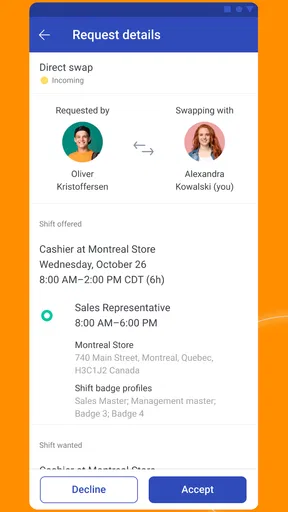
A realistic example: I might check the next shift before arranging an appointment, then see that a colleague has requested a swap. I can review the request in the same work space where schedule information and messages sit, rather than trying to reconstruct the conversation later from several channels. I would still wait for confirmation before treating the change as settled.
That convenience has a boundary. A phone can be awkward to use while serving customers, handling stock, or working in a place where personal devices are discouraged. I’d check information before a shift or during an allowed break, then put the phone away when the job requires attention. The app helps organize work; it should not become a reason to interrupt it.
Worth Reading Before You Choose

EA SPORTS FC Mobile 26 Is a Bigger Football Game, but It Takes Time

Flipboard Shows What News Apps Must Do Beyond the Feed

Switching to Android Auto Means Rethinking Your Driving Routine

Google Calendar Makes a Crowded Week Easier to Manage

Ludo King Makes the Most of the Minutes Between Plans

Baby Panda World Brings Quick Play to Modern Phones, but Its Game Library Feels Busy
How WorkJam fits into a workday
I look at WorkJam as a workday companion whose usefulness depends on how your employer has organized it, not just on what appears after you install it. In this section, I’ll focus on the moments when a connection affects whether a schedule check, request, or message is actually useful, then turn to how those moments fit into a mobile shift.
Getting Started with WorkJam
First off, onboarding with WorkJam is as smooth as a freshly brewed cup of coffee on a Monday morning. The app is available for both Android and iOS, and downloading it is a breeze. Once you’ve got it up and running, you’ll need an invite code from your employer to log in, which keeps everything nice and secure.
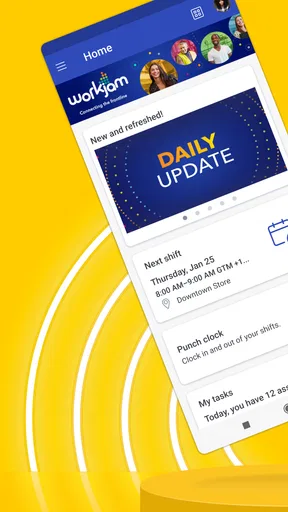
The interface is clean and intuitive - no frills, just what you need to get the job done. It’s all about functionality here, and that’s something I can get on board with. The home screen gives you a quick overview of your schedule, messages, and tasks, so you’re always in the loop.
That employer invitation is an important practical detail: downloading the app alone does not give you access to a workplace account. If you are considering it for a new job, ask your manager or workplace administrator how they issue access and which parts of the app your team uses. The developer is WorkJam, Inc., and the app is listed in the business category.
Scheduling Made Simple
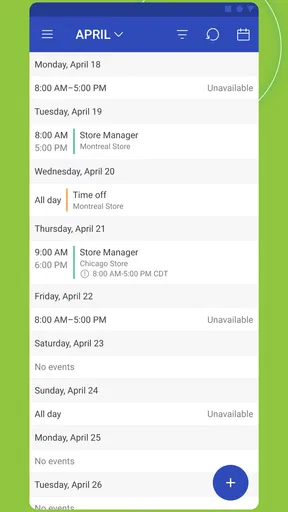
One of the standout features of the app is its scheduling capabilities. Forget those days of chasing down your manager for shift changes or scribbling down shift times on sticky notes that always seem to disappear. With WorkJam, everything is digital and easily accessible.
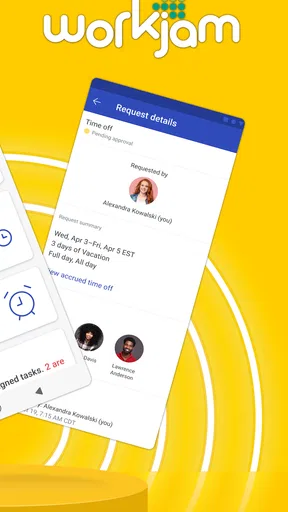
You can view your upcoming shifts, request time off, or swap shifts with colleagues if something pops up. It’s like having a personal assistant in your pocket, minus the coffee runs. Plus, managers can approve changes in real time, which means no more waiting around for confirmation.
For shift workers, the useful habit is to separate checking the schedule from acting on a request. I’d review upcoming shifts when planning the week, submit a change through the app when needed, and then look for the final approval before changing my calendar or travel plans. This keeps a pending request from being mistaken for a confirmed shift.
Compared with a shared spreadsheet or a printed rota, an app can make requests and updates easier to follow in one place. A basic calendar, meanwhile, may be better for personal reminders once a shift is confirmed, but it will not replace the workplace process for asking a manager to approve a change. WorkJam makes most sense when the employer actively uses it to manage schedules, rather than when staff are expected to maintain several competing versions.
Communication at Your Fingertips
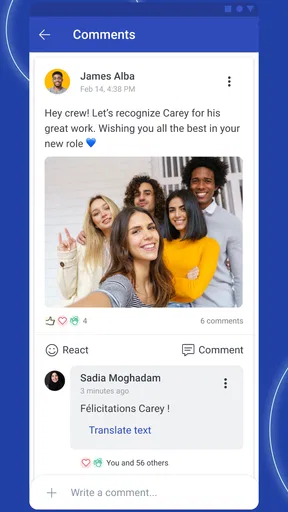
Communication is key in any workplace, and WorkJam seems to get that. The app includes a messaging feature that allows you to chat with your team or send direct messages to your manager. It’s all about keeping everyone on the same page, and I found this feature to be incredibly useful.
No more endless email chains or missing out on important info because you weren’t on the group text. Everything is centralized, making communication not just easy but also efficient.
Centralized messages can help when a team needs to refer back to work-related instructions, especially if a detail would otherwise disappear in a busy personal chat. I would still keep messages clear and specific: include the shift or task you mean, and do not assume a colleague has seen a note just because it was sent. For urgent matters, use the contact method your workplace expects rather than relying on an unread message.
There is also a trade-off in keeping work communication on a phone. Notifications can make updates easier to notice, but they can become distracting outside working hours. I’d use the app for work conversations and check it at sensible times, instead of feeling obliged to monitor every message continuously.
Learning and Development Tools
But wait, there’s more! WorkJam isn’t just about scheduling and messaging. It also offers some fantastic learning and development tools. Whether you’re looking to brush up on your skills or pick up some new ones, the app’s got you covered.
Employers can upload training materials, quizzes, and other resources directly to the app. This means you can learn at your own pace, whenever you have a free moment. And who doesn’t love a bit of professional development on their own terms?
In practice, short learning moments are likely to fit better than trying to work through everything in the middle of a busy shift. If a resource includes a quiz, I’d take it when I can focus and have a stable connection, rather than rushing through it between tasks. Employers control what is made available, so the usefulness of this part of the app depends on whether your organization keeps its materials relevant and clear.
Task Management
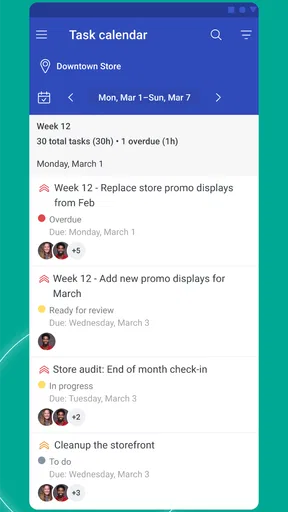
Task management is another area where WorkJam shines. Managers can assign tasks directly through the app, and you can tick them off as you complete them. It’s a great way to keep track of what needs to be done and ensure nothing falls through the cracks.
The task list is straightforward and easy to use, which is exactly what you need in a fast-paced work environment. It’s like having a digital to-do list that you can’t lose in the bottom of your bag.
A helpful way to use a task list is to check it at the start of a shift, identify anything time-sensitive, and review it again before leaving. That gives you a simple routine without turning the app into a substitute for asking questions when instructions are unclear. Tasks that depend on equipment, customer needs, or a manager’s decision still call for ordinary workplace communication.
Compared with a personal notes app, WorkJam’s advantage is that assigned work can sit alongside the team’s other work information. A notes app may be more flexible for private reminders, but it cannot provide the same shared context. Conversely, if your employer does not assign tasks through WorkJam, a separate to-do list may be less effort than checking an unused task area.
When connection falters, and who should choose it
A weak signal can turn a quick check into a frustrating pause, particularly if you need to see an update before making a decision. My practical approach would be to check the schedule and any important messages before entering a low-coverage area, then reconnect and review the app when service is available. If something appears stuck, avoid sending repeated requests immediately; first check whether the original action has gone through, then ask a manager if the outcome affects your shift.
I would not choose WorkJam as my only source of information in a workplace where staff cannot reliably use phones or where schedules are communicated through another established system. It is also not a personal calendar replacement: its purpose is workplace coordination, and access depends on the employer. For a team that already relies on printed schedules and does not want to change its process, the app may add another step instead of removing one.
For an hourly worker whose employer actively uses its scheduling, messaging, training, and task tools, the centralization is the strongest reason to try it. WorkJam has a 4.5 average from around 16,000 ratings, and it has been installed over a million times. It is rated for Everyone, is free, and its current version is 2026.6.18; it first appeared on September 3, 2015, and supports Android 7.0 or later.
A practical connectivity verdict
My overall view is that WorkJam can make a frontline workday easier to organize, but it works best as part of a workplace routine rather than as a magic fix. Its schedule and task tools are most useful when people check them at predictable moments, while messaging is valuable when the team agrees that the app is a place to look for work updates. Reliable connectivity helps, but sensible habits matter too: confirm approvals, check key information before a shift, and use the expected backup channel when a message cannot wait.
If your employer has invited you and uses the app consistently, I’d give it a try. If you are looking for a general planner, a standalone chat app, or a tool that works independently of your employer’s setup, a simpler alternative may suit you better. For the right team, though, WorkJam brings everyday work details into one mobile place without asking workers to juggle as many separate channels.
Pros
- User-friendly interface makes navigation easy.
- Offers real-time communication with teams.
- Integrates seamlessly with existing systems.
- Customizable features to fit business needs.
- Improves employee engagement and productivity.
Cons
- Limited offline functionality can be restrictive.
- Occasional app slowdowns during peak times.
- Some features require premium subscription.
- Notifications can become overwhelming.
- Initial setup can be time-consuming.
FAQs for WorkJam
What is WorkJam and how does it benefit employees?
WorkJam is a comprehensive digital workplace platform designed to streamline workforce management. It benefits employees by providing a user-friendly interface for scheduling, communication, and task management. Employees can easily access their schedules, communicate with managers, and receive training materials, enhancing overall productivity and job satisfaction.
How secure is the WorkJam app in terms of data protection?
WorkJam prioritizes data security and employs industry-standard encryption protocols to protect user information. The app ensures that all sensitive data, including personal and employment details, are securely stored and accessible only to authorized users. Regular security audits and updates are conducted to maintain high security standards.
Can WorkJam integrate with existing HR and payroll systems?
Yes, WorkJam is designed to seamlessly integrate with various HR and payroll systems. This integration allows for streamlined data flow between platforms, reducing administrative workload and ensuring accurate information across systems. Businesses can customize the integration based on their specific needs, enhancing operational efficiency.
Is WorkJam suitable for businesses of all sizes?
WorkJam is scalable and adaptable, making it suitable for businesses of all sizes, from small enterprises to large corporations. Its flexible features can be tailored to meet the specific needs and complexities of different business environments, ensuring that it can support diverse workforce management requirements effectively.
What kind of support does WorkJam offer to its users?
WorkJam provides comprehensive support to its users, including access to a dedicated customer service team, detailed user guides, and online resources. The app also offers training sessions and webinars to help users maximize its features. Support is available through multiple channels, ensuring timely assistance for any issues that may arise.


